Reverse Osmosis Membrane and Filter Replacement: The Complete Maintenance Schedule for South Florida Homeowners
By Jared Beviano | Water Wizards Filtration
I was at a house in Boynton Beach last week doing a routine service call when the homeowner said something that made me wince.
"The RO system? Oh, that's been working great. We haven't touched it since you guys installed it."
That installation was four years ago.
Four years. No filter changes. No membrane replacement. No maintenance whatsoever.
I opened the cabinet under his sink and pulled out the sediment pre-filter. It was supposed to be white. What I extracted was a brown, slimy cylinder that looked like it had been dredged from a swamp. The carbon pre-filters weren't much better. And when I tested the water coming out of his RO faucet, the TDS reading was 285 ppm.
For context, properly functioning RO should produce water at 10-30 ppm. His "filtered" water wasn't much better than tap.
Here's the thing—this guy wasn't negligent. He genuinely thought RO systems were install-and-forget. Nobody had explained the maintenance requirements. The system kept producing water, so he assumed everything was fine.
It wasn't fine. The membrane was destroyed from processing water through clogged pre-filters for years. What should have been $150 in annual filter changes turned into a $350 membrane replacement plus the filter service.
So let's fix that knowledge gap right now. Here's everything you need to know about RO system maintenance—what needs replacing, when, why it matters, and how to tell if you're overdue.
Safe to Drink?
How Reverse Osmosis Systems Actually Work (And Why Every Stage Matters)
Before we talk about maintenance schedules, you need to understand what's happening inside that system under your sink. Each component has a specific job, and when one fails, it affects everything downstream.
The Typical RO System Layout
Most residential RO systems have 4-6 stages. Here's what each one does:
Stage 1: Sediment Pre-Filter
This is the bouncer at the door. It catches particles—sand, silt, rust, dirt—before they can reach the more delicate components downstream. Typical rating is 5 microns, meaning it blocks anything larger than 5 microns (for reference, a human hair is about 70 microns).
Why it matters: If sediment reaches the RO membrane, it physically damages the membrane surface. Those tiny particles act like sandpaper, creating microscopic tears that let contaminants through.
Stage 2: Carbon Pre-Filter (Granular Activated Carbon)
This stage removes chlorine and chloramines—the disinfectants municipalities add to water. It also catches organic compounds, pesticides, and chemicals that cause taste and odor issues.
Why it matters: RO membranes are extremely sensitive to chlorine. Chlorine exposure degrades the thin-film composite material that enables the membrane to function. A membrane exposed to chlorinated water—even briefly—can be permanently damaged.
Stage 3: Carbon Block Pre-Filter
A second carbon stage, this time using compressed carbon block instead of loose granules. It provides finer filtration and catches anything the first carbon stage missed.
Why it matters: This is the last line of defense before water hits the membrane. It polishes out the remaining chlorine and fine particles.
Stage 4: The RO Membrane
This is the heart of the system—a semi-permeable membrane with pores so small (0.0001 microns) that virtually nothing gets through except water molecules. This is where the magic happens.
The membrane removes dissolved solids: heavy metals, nitrates, fluoride, arsenic, PFAS, pharmaceuticals, sodium, and hundreds of other contaminants. It's why RO water tests at 10-30 ppm TDS while South Florida tap water often runs 300-500 ppm.
Why it matters: The membrane is the most expensive component and the hardest to replace. Everything upstream exists to protect it.
Stage 5: Post-Carbon Filter (Polishing Filter)
After water passes through the membrane and sits in the storage tank, it passes through one more carbon filter before reaching your faucet. This "polishes" the water—removing any taste or odor it might have picked up from the storage tank.
Why it matters: Water sitting in a tank can develop a stale taste. The post-filter ensures every glass tastes fresh.
Stage 6 (Optional): Remineralization
Some systems add minerals back into the water after RO removes everything. This raises the pH (RO water tends to be slightly acidic), improves taste, and adds back beneficial minerals such as calcium and magnesium.
Why it matters: Pure RO water can taste "flat" to some people. Remineralization makes it taste more like natural spring water.
The Complete RO Maintenance Schedule
Now that you understand what each component does, here's when to replace them—and I'm going to give you the real-world South Florida schedule, not just what the manufacturer manual says.
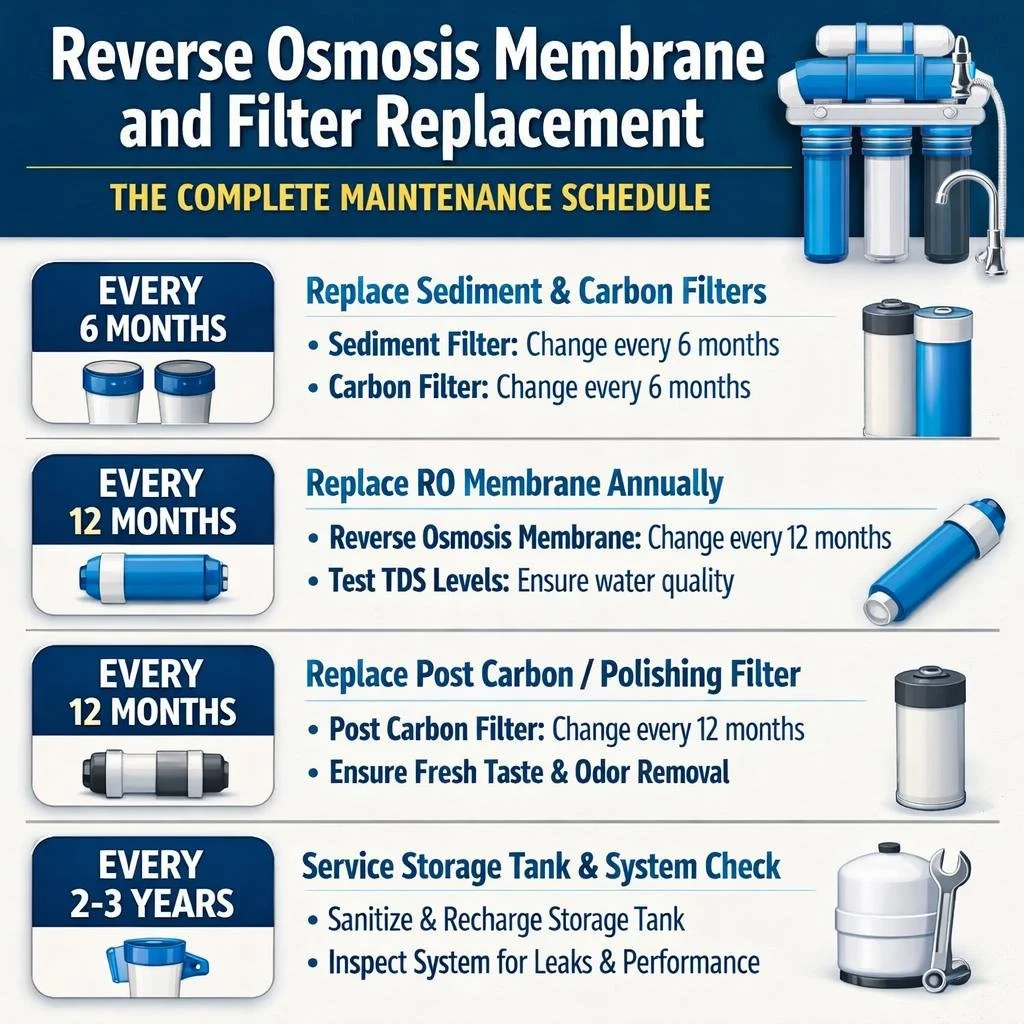
Sediment Pre-Filter: Every 6 Months
Manufacturer recommendation: 6-12 months South Florida reality: 6 months, sometimes sooner
Our water has more sediment than you'd think, especially if you're in an older neighborhood with aging pipes or if your area has had water main work recently. I've pulled sediment filters at 4 months that were completely brown and restricting flow.
Signs you're overdue:
Visible discoloration (should be white or off-white, not brown/orange/gray)
Reduced water production from your RO faucet
The system seems to run constantly
Pressure gauge (if you have one) shows increased pressure drop
Cost: $8-15 for the filter itself, or $45-75 if we do it as part of a service call
Can you DIY this? Yes—it's the easiest filter to change. Turn off the supply, depressurize the system, unscrew the housing, swap the filter, reassemble. Takes about 10 minutes once you've done it a couple of times.
Carbon Pre-Filters: Every 6-12 Months
Manufacturer recommendation: 6-12 months South Florida reality: 6 months for most households, especially if you're on city water with high chlorine
Here's the thing about carbon filters—they don't show obvious visual signs of exhaustion. A carbon filter can look perfectly fine and be completely spent. The carbon's adsorption capacity is used up long before it looks dirty.
In South Florida, with our aggressive chlorination (most utilities use chloramines, which are harder on carbon than straight chlorine), I recommend 6-month changes for both carbon pre-filters. Yes, that's more frequent than the manual suggests. But I've tested water at 9 months and found chlorine breaking through, which means the membrane is being damaged.
Signs you're overdue:
Chlorine taste or smell in RO water
Water production has slowed
TDS readings starting to creep up
Cost: $15-25 per filter (usually two carbon stages), or $65-95 for both as part of a service call
Can you DIY this? Yes, same process as sediment filter. Just make sure you install them in the correct direction (there's usually an arrow showing flow direction).
RO Membrane: Every 2-3 Years
Manufacturer recommendation: 2-5 years South Florida reality: 2-3 years for most households
The membrane lifespan varies enormously based on incoming water quality, how well the pre-filters were maintained, and how much water your household uses. A family of five running 10+ gallons per day through the system will exhaust the membrane faster than a couple using 3 gallons daily.
I've seen membranes last 5 years in homes with light use and diligent pre-filter changes. I've seen membranes fail in 18 months when pre-filters were neglected.
In South Florida, with our challenging water quality, I tell people to plan on 2-3 years. If you're testing your water and TDS stays low, you might stretch it longer. But don't assume a membrane is good just because water comes out.
Signs you're overdue:
TDS readings above 30-50 ppm (depends on your incoming water, but significant increase from baseline is the warning sign)
Water production has dropped noticeably
Water tastes different—less "pure"
System was running without proper pre-filter maintenance
Cost: $60-150 for the membrane itself depending on brand and capacity, or $150-250 for professional membrane replacement service
Can you DIY this? It's more involved than filter changes but doable. You need to disconnect the membrane housing, remove the old membrane, install the new one, reconnect everything, and flush the system properly. If you're comfortable with basic plumbing, you can handle it. If the thought of disconnecting tubes makes you nervous, call us.
Post-Carbon Filter: Every 12 Months
Manufacturer recommendation: 12 months South Florida reality: 12 months is accurate
The post-filter sees much less abuse than the pre-filters because it only processes the clean water that's already been through the membrane. Annual replacement is usually sufficient.
Signs you're overdue:
Taste changes (stale, flat, or off flavors)
Odor in the RO water
It's been more than a year
Cost: $15-25 for the filter, or included in annual service visits
Can you DIY this? Yes, easy swap like the other filters.
Remineralization Filter (If Equipped): Every 12 Months
Manufacturer recommendation: 12 months South Florida reality: 12 months, sometimes longer
If your system has a remineralization stage, the mineral media does get exhausted over time. Annual replacement keeps the pH and mineral content consistent.
Signs you're overdue:
pH testing shows water becoming more acidic
Taste becoming "flatter"
Over 12 months since last change
Cost: $20-35 for the cartridge
Storage Tank: Every 7-10 Years
This one surprises people—the storage tank doesn't last forever. Inside the tank is a rubber bladder that holds water under pressure. Over time, the bladder degrades, loses air pressure, and eventually fails.
Signs of tank failure:
Tank feels waterlogged (heavy, no air pressure when you knock on it)
System runs constantly trying to fill a tank that won't hold pressure
Reduced water delivery even after filter changes
Visible leaking from the tank
Cost: $60-120 for the tank, or $150-200 for professional replacement
The Real Cost of Neglected Maintenance
Let me show you the math on why staying current on RO maintenance actually saves money.
Scenario 1: Proper Maintenance
Annual cost for a typical household:
Sediment filter (2x per year): $30
Carbon pre-filters (2 sets per year): $80
Post-carbon filter: $20
Membrane (prorated over 3 years): $40
Total annual cost: ~$170
Over 10 years, you'll spend roughly $1,700 on maintenance plus maybe one tank replacement ($150). Total: ~$1,850
Scenario 2: Neglected Maintenance
Here's what I see regularly:
Membrane destroyed from chlorine exposure because carbon filters weren't changed: $150-250 for new membrane
Membrane destroyed twice because the pattern continues: another $150-250
Tank failure from constant running: $150-200
Eventually the whole system is so gunked up it needs replacement: $400-1,200 for new system
All the tap water you drank, thinking it was filtered (but wasn't): priceless concerns
Total cost over 10 years: $1,000-2,500+, and you weren't actually getting filtered water for much of that time.
The "savings" from skipping maintenance aren't savings at all. They're deferred costs that compound with interest.
How to Tell If Your RO System Is Actually Working
This is crucial: just because water comes out of your RO faucet doesn't mean it's properly filtered. Here's how to actually verify your system is doing its job.
Get a TDS Meter
A TDS (Total Dissolved Solids) meter costs $15-25 on Amazon and is the single most useful tool for monitoring your RO system. It measures the dissolved solids in water and gives you a parts-per-million reading.
How to use it:
Test your tap water (before the RO). In South Florida, this typically reads 300-600 ppm.
Test your RO water. It should read 10-50 ppm, or about 90-95% lower than tap.
What the numbers mean:
0-25 ppm: Excellent. Membrane is working great.
25-50 ppm: Good. Membrane is functioning but watch for increases.
50-100 ppm: Fair. Membrane is aging or pre-filters are exhausted. Service soon.
100+ ppm: Poor. Membrane is likely failed or severely compromised. Service immediately.
I recommend testing monthly. Takes 30 seconds. If you see TDS creeping up over a few months, that's your signal to check filters and potentially replace the membrane.
Monitor Water Production
A healthy RO system produces water at a consistent rate. If you notice that filling a glass takes noticeably longer than it used to, something is restricting flow—usually clogged pre-filters or a failing membrane.
Taste Test
I know this sounds unscientific, but taste matters. You got an RO system because you wanted water that tastes clean and pure. If that taste changes—gets a chemical edge, tastes flat, has any off flavors—something has changed. Trust your senses.
Annual Professional Testing
Once a year, have your water tested for specific contaminants—not just TDS. This confirms the system is actually removing what you need it to remove. We test RO water as part of our annual service visits, but you can also send samples to independent labs.
The DIY vs. Professional Maintenance Decision
Let me give you an honest assessment of what you can handle yourself versus when to call us.
Good DIY Candidates
Sediment and carbon pre-filter changes: These are straightforward. Turn off the water, release pressure, unscrew housing, swap filter, reassemble. If you can change a furnace filter, you can do this.
Post-filter changes: Same process, usually even easier because it's an inline filter rather than a housing.
TDS testing: Buy a meter, test monthly. No expertise required.
Basic troubleshooting: Checking for leaks, making sure connections are tight, verifying the tank has proper air pressure.
Better Left to Professionals
Membrane replacement: It's not impossibly difficult, but there's more room for error. Improper installation can damage the new membrane. The housing connections can leak if not done right. And you need to flush the system properly before use.
Diagnosing problems: If your TDS is high but you're not sure why—is it the membrane, the pre-filters, or the seals?—a professional can diagnose systematically rather than replacing parts randomly.
Tank replacement: Involves more plumbing and can be awkward in tight under-sink spaces.
System sanitization: If your system has been neglected or contaminated, proper sanitization requires specific procedures and solutions.
Annual comprehensive service: Having a professional inspect everything once a year catches issues you might miss—small leaks, fitting corrosion, tank pressure problems, and optimization opportunities.
The Hybrid Approach
What I recommend to most customers: do your own filter changes every 6 months (it's easy and saves money), but schedule one professional service visit annually. We'll check everything you might miss, do the post-filter and any annual items, test the water, and give you a status report on the membrane.
This approach costs maybe $100-150 per year for the service visit plus your $50-60 in DIY filter costs—much less than paying us for every filter change, but with professional oversight to catch problems early.
Filter Replacement: Step-by-Step for DIYers
If you want to handle filter changes yourself, here's the process.
Before You Start
Gather supplies:
Replacement filters (make sure they're the right size and type for your system)
Towels (some water will spill)
A bucket or container
Optionally: food-grade silicone lubricant for o-rings
Locate your system's shutoff valve. This is usually a small valve on the water line feeding the RO system. Turn it to shut off water supply to the system.
Relieve pressure. Open the RO faucet and let water run until it stops. This depressurizes the system.
Changing Pre-Filters (Sediment and Carbon)
Place towels under the filter housings to catch drips.
Unscrew the filter housings. They turn counterclockwise. Some systems have a special wrench; others can be done by hand. If it's tight, the wrench helps.
Remove the old filters. Note which direction they were installed—most have a flow direction arrow.
Inspect the o-rings on the housing caps. If they're cracked, dried out, or deformed, replace them. If they look okay, apply a thin layer of silicone lubricant to keep them sealing properly.
Insert the new filters. Make sure they're seated properly and oriented correctly.
Hand-tighten the housings. Don't overtighten—snug is enough. Overtightening can crack housings.
Turn the water supply back on slowly. Check for leaks around the housings.
Let the system run for 5-10 minutes to flush the new filters. Discard this water.
Test TDS to confirm everything is working.
Changing the Post-Filter
Post-filters are usually inline cartridges rather than housings. The process:
Note which direction the filter is installed (there's an arrow showing flow direction).
Disconnect the tubing from both ends of the filter. Usually these are push-fit connections—press the collet ring and pull the tube out.
Install the new filter in the correct orientation.
Push the tubing firmly into the new connections until it seats.
Turn on water, check for leaks, flush for a few minutes.
South Florida-Specific RO Considerations
Our local water quality creates some unique maintenance considerations.
High TDS Incoming Water
South Florida tap water often runs 350-500 ppm TDS—some of the highest in the country. This means your RO membrane is working harder to achieve the same results as a system in an area with 150 ppm tap water. Higher incoming TDS generally means shorter membrane life.
Chloramines
Most South Florida utilities use chloramines rather than straight chlorine for disinfection. Chloramines are harder on both carbon filters and RO membranes. This is why I recommend 6-month carbon filter changes rather than the 12 months some manufacturers suggest.
Hardness
Our water is hard—often 15-25 grains per gallon. If you don't have a water softener upstream, hardness minerals can scale up RO components over time. The membrane is somewhat protected, but the pre-filters and fittings can accumulate scale.
If you have both a water softener and RO system, the softener should be upstream (treating all house water including the RO feed). This significantly extends RO component life.
PFAS Concerns
For homeowners near airports or military installations, RO is often the primary PFAS protection. This makes proper maintenance even more critical—you're relying on this system for health protection, not just taste improvement. A compromised membrane might still produce water that tastes okay but isn't removing PFAS effectively.
Hurricane Season
After hurricanes or major storms, water quality can be temporarily compromised. If you're on well water, have the water tested before trusting your RO system. If you're on city water and there's a boil water notice, your RO system may or may not provide adequate protection—it depends on the specific contamination and your system's condition.
Post-storm is a good time for a system check and possibly early filter changes if you suspect water quality degradation during the event.
When to Replace vs. Repair vs. Upgrade
Sometimes the question isn't "what filter do I need?" but "is this whole system worth maintaining?"
Keep Maintaining If:
System is less than 8-10 years old
Replacement parts are readily available
Performance is good with proper filter changes
System meets your household's capacity needs
Consider Replacing If:
System is 10+ years old with multiple failing components
Replacement parts are obsolete or hard to find
Tank has failed and other components are aging
You need higher capacity than current system provides
Technology has significantly improved since your system was installed
Consider Upgrading If:
Current system lacks remineralization and you want it
You want smart monitoring features (some newer systems have leak detection, filter life monitoring, app connectivity)
You're renovating and have the opportunity to install a higher-capacity system
Water quality concerns have increased (you now need PFAS protection and your current system isn't rated for it)
The Math on Repair vs. Replace
A new quality RO system costs $200-400 for the unit plus $150-250 for installation—total $350-650 installed.
If your current system needs membrane ($150) + tank ($150) + all filters ($75), you're at $375 in repairs. At that point, depending on the system's age and condition, a new system might make more sense.
Rule of thumb: if total repairs exceed 50-60% of new system cost, and the system is over 7-8 years old, consider replacement.
Setting Up a Maintenance Schedule You'll Actually Follow
The best maintenance schedule is the one you actually follow. Here's how to make it happen:
Option 1: Calendar Reminders
Set recurring reminders in your phone:
Every 6 months: "Check/change RO pre-filters"
Every 12 months: "RO post-filter + annual inspection"
Every 2-3 years: "Test membrane / consider replacement"
Simple, free, and effective if you actually respond to reminders.
Option 2: Maintenance Service Agreement
Sign up for our maintenance program. We track the schedule and contact you when service is due. We show up, handle everything, and you don't have to think about it.
Annual RO maintenance service runs $149-195 and includes all filters, inspection, testing, and sanitization if needed. Membrane replacement is extra if needed, but we test and advise rather than automatically replacing.
For people who know they won't stay on top of DIY maintenance, this is often the better choice. Paying $150/year to know it's done right beats paying $350 every few years because you let filters go too long.
Option 3: Hybrid Approach
DIY filter changes (I'll mail you filters on schedule if you want), professional annual checkup. Best of both worlds—you save money on routine items, we catch anything you might miss.
Common RO Maintenance Mistakes
Let me save you from the errors I see regularly.
Mistake 1: Waiting Until Water Tastes Bad
By the time you notice taste changes, filters have been exhausted for a while and the membrane may already be damaged. Stick to the schedule, not your taste buds.
Mistake 2: Using Wrong Filter Sizes
RO systems use specific filter dimensions. A filter that's close to the right size isn't the right size. Verify compatibility before ordering. If you're not sure, snap a photo of your current filters and send it to us—we'll identify the correct replacements.
Mistake 3: Forgetting the Post-Filter
It's easy to remember the pre-filters because they get visibly dirty. The post-filter looks clean because it's processing already-filtered water. But it still needs annual replacement.
Mistake 4: Never Testing TDS
You can't see membrane degradation. You can't taste 100 ppm TDS versus 30 ppm. The only way to know your membrane is actually working is to test. Get a TDS meter.
Mistake 5: Overtightening Housings
Hand-tight plus a quarter turn is enough. Cranking down on filter housings cracks the plastic over time. I've seen housings fail and flood under-sink cabinets because someone gorilla-gripped them at every filter change.
Mistake 6: Skipping System Flush
New filters need flushing. New membranes especially need flushing—they're shipped with a preservative that needs to be rinsed out. Run water through the system for several minutes and discard before drinking.
Mistake 7: Ignoring Small Leaks
A little moisture at a fitting seems minor. It's not. Small leaks get bigger. Fittings that seep are telling you something is wrong. Fix small leaks immediately.
The Bottom Line on RO Maintenance
Your reverse osmosis system is the last line of defense between South Florida tap water and your family's drinking water. It removes PFAS from airport contamination. It removes lead from old pipes. It removes nitrates, arsenic, pharmaceuticals, and hundreds of other contaminants.
But it only works if you maintain it.
The maintenance schedule isn't complicated:
Pre-filters every 6 months (sediment and carbon)
Post-filter every 12 months
Membrane every 2-3 years (or when TDS testing indicates)
Tank every 7-10 years
TDS testing monthly (takes 30 seconds)
Total annual cost: $150-200 if you DIY, or about the same with a maintenance agreement.
That investment protects a system that would cost $400-800 to replace. More importantly, it ensures you're actually getting the water quality you think you're getting.
The family in Boynton Beach I mentioned at the beginning? They're on our maintenance program now. Every six months we show up, change filters, test the water, and confirm everything is working. Their TDS runs about 18 ppm—exactly what it should be. They never think about RO maintenance anymore.
That's how it should work.
Need RO system maintenance or not sure when your filters were last changed?
Call Water Wizards at 561-352-9989 or visit waterwizards.ai to schedule service.
Water Wizards Filtration — Florida's Water Filtration Experts
Serving Delray Beach, Boca Raton, West Palm Beach, Jupiter, Wellington, Boynton Beach, Fort Lauderdale, and all of South Florida.
Frequently Asked Questions: RO Membrane and Filter Replacement
How often should I replace my RO membrane in South Florida?
Plan on replacing your RO membrane every 2-3 years in South Florida, though actual lifespan depends on incoming water quality, household usage, and how diligently you maintain pre-filters. Our water is challenging—high TDS (350-500 ppm), aggressive chloramines, and significant hardness all stress membranes more than average. The single biggest factor is pre-filter maintenance: a membrane protected by fresh pre-filters can last 3-4 years, while a membrane exposed to chlorine because carbon filters were neglected might fail in 18 months. Test TDS monthly with a $20 meter—if readings climb above 50 ppm or increase significantly from baseline, the membrane is likely failing.
How do I know when my RO filters need to be changed?
Pre-filters (sediment and carbon) should be changed every 6 months in South Florida regardless of appearance—carbon exhaustion isn't visible. However, signs you're overdue include reduced water production at the RO faucet, chlorine taste or smell in filtered water, TDS readings creeping upward, and visible discoloration of sediment filters (brown, orange, or gray instead of white). Post-filters need annual replacement; signs of exhaustion include stale or flat taste in RO water. Don't wait for symptoms—stick to the schedule because by the time you notice problems, membrane damage may have already occurred from chlorine exposure or sediment passing through exhausted pre-filters.
Can I replace RO filters myself or do I need a professional?
Pre-filter and post-filter changes are good DIY projects for most homeowners—turn off water supply, depressurize the system, unscrew housings, swap filters, reassemble, flush. Takes 15-20 minutes once you've done it before. Membrane replacement is more involved (more connections, proper orientation matters, requires thorough flushing) but still manageable for DIY-comfortable homeowners. Tank replacement and diagnosing problems are better left to professionals. Many customers take a hybrid approach: DIY filter changes every 6 months, professional service annually for comprehensive inspection, testing, and any complex items. This balances cost savings with professional oversight.
How much does RO system maintenance cost per year in South Florida?
Annual RO maintenance costs $150-200 for typical South Florida households. DIY approach: sediment filter 2x ($30), carbon pre-filters 2 sets ($80), post-filter ($20), plus prorated membrane cost ($40/year if replacing every 3 years) = approximately $170/year. Professional maintenance service runs $149-195 annually and includes all filters, system inspection, water testing, and sanitization if needed—membrane replacement is additional when required. Neglecting maintenance seems cheaper short-term but costs more long-term: destroyed membranes ($150-250 each), premature system replacement ($400-800), and drinking inadequately filtered water while thinking you're protected.
What happens if I never change my RO filters?
Neglecting RO maintenance causes cascading failures. First, sediment filter clogs, restricting flow and forcing particles toward the membrane. Next, carbon filters exhaust, allowing chlorine through—chlorine degrades the membrane's thin-film composite material, causing permanent damage. The membrane develops micro-tears and stops rejecting contaminants effectively. TDS in your "filtered" water climbs toward tap water levels. Eventually the membrane fails completely. What should cost $170/year in maintenance becomes $350+ in membrane replacement, plus you weren't actually getting filtered water during the neglect period. I've tested "RO water" at 285 ppm in systems that hadn't been maintained—barely better than the 350 ppm tap water.
Why is my RO system producing water slowly?
Slow water production usually indicates clogged pre-filters restricting flow, exhausted membrane with reduced permeability, low tank pressure (bladder losing air), or low incoming water pressure. Start troubleshooting by checking pre-filter condition—if they're overdue for replacement, change them and see if production improves. Next, test TDS: if it's high, the membrane is likely the issue. Check tank pressure by pressing the Schrader valve (like a tire valve) on the tank bottom—you should hear air. Empty tanks should have 7-10 PSI; if pressure is low, add air with a bicycle pump. If filters are fresh, membrane tests good, and tank pressure is correct, the issue may be low household water pressure or a system component failure requiring professional diagnosis.
What's the difference between RO membrane replacement and RO filter replacement?
Filters and membranes are different components with different functions and replacement schedules. Pre-filters (sediment and carbon) protect the membrane from particles and chlorine—they're replaced every 6 months and cost $10-25 each. The post-filter polishes water after the tank—replaced annually, costs $15-25. The membrane is the core component that actually removes dissolved contaminants through reverse osmosis—replaced every 2-3 years, costs $60-150. Think of filters as consumables that protect the membrane, and the membrane as the expensive component you're trying to preserve. Proper filter maintenance extends membrane life; neglecting filters destroys membranes prematurely.
Should I replace all RO filters at the same time?
No—different filters have different replacement schedules. Pre-filters (sediment and carbon) need replacement every 6 months in South Florida. Post-filter needs annual replacement. The membrane needs replacement every 2-3 years. Replacing everything together wastes money on components that don't need it yet. However, if you're having a professional service visit, it makes sense to do all filters due at that time to minimize service calls. A good schedule: Month 6 (DIY pre-filter change), Month 12 (professional visit—pre-filters, post-filter, inspection, testing), Month 18 (DIY pre-filter change), Month 24 (professional visit plus membrane evaluation). This keeps everything current without unnecessary replacement.
How do I know what replacement filters to buy for my RO system?
Check your system's model number (usually on a label under the sink or in the owner's manual) and purchase filters specified for that model. Filter sizes vary—common dimensions include 10"x2.5" standard and 10"x4.5" large capacity, but fit must be exact. If you're unsure, remove a current filter and measure it or photograph it for reference. Membrane sizing also varies by system capacity (50 GPD, 75 GPD, 100 GPD are common residential sizes). Buying generic filters is usually fine for sediment and carbon pre-filters; membrane quality matters more—stick with reputable brands. When in doubt, contact us with your system model and we'll identify the correct replacement parts.